
Summary
- Memory integrity is a Windows security feature that checks drivers and other low-level code inside a walled-off, virtualized area before letting it run, so malware can’t easily use a driver to take over your PC.
- You’ll find it in Windows Security > Device security > Core isolation details. Microsoft also calls it HVCI.
- For most home PCs, Microsoft recommends leaving it on. It’s already on by default on many new Windows 11 devices.
- If it won’t turn on, Windows usually names an incompatible driver. Update or remove that driver rather than giving up on the feature.
- Memory integrity is one of the checks in Windows baseline protection, which is in preview for Windows Insiders, with general release planned for 2027.
You open Windows Security to check something simple and find a yellow warning: Memory integrity is off. Or a game forum tells you to switch it off for more FPS. Either way, the name doesn’t explain much. Memory of what? Integrity against what? This explainer covers what memory integrity actually does, the jargon around it, how to see whether it’s on, and how to decide what to do on your own PC.
Checked against: Microsoft Support’s Device security page, Microsoft Learn’s memory integrity documentation and Microsoft’s Windows baseline protection announcement, opened on 24 November 2026 (PKT).
Memory integrity in plain English
Every piece of hardware in your PC talks to Windows through a driver: a small program for your graphics card, Wi-Fi chip, keyboard, webcam and so on. Drivers run very close to the heart of Windows, the kernel, so they have a lot of power. That’s exactly why attackers like them. A malicious or badly written driver can give malware the same deep access.
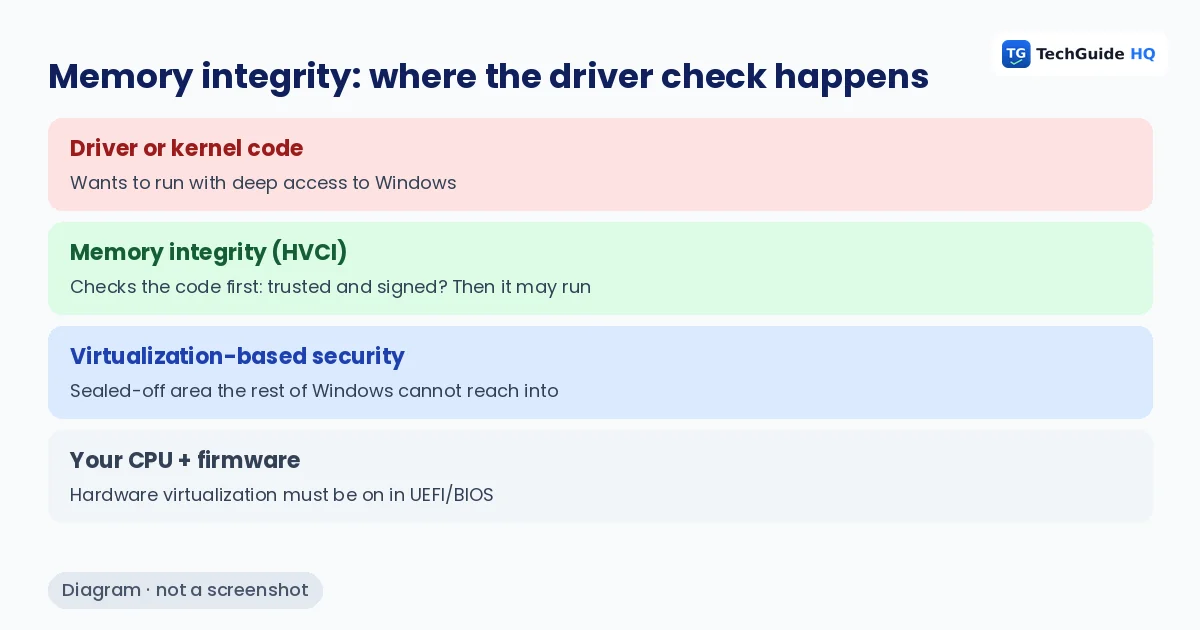
Memory integrity is the gatekeeper for that kind of code. Before kernel-level code such as a driver is allowed to run, it gets checked. The clever part is where the check happens. Windows uses the hardware virtualization in your processor to create a sealed-off area that the rest of the system can’t reach into, and the checking runs inside it.
Microsoft’s own analogy is a security guard in a locked booth. Without memory integrity, the guard stands in the open, where malware could interfere with them. With it, the guard sits behind glass, and anything that wants to run has to pass its paperwork through the window first. In normal use this happens very quickly, and you won’t notice it.
The jargon, decoded
Search for memory integrity and you’ll hit four or five other terms within a minute. Here’s how they fit together.
| Term | What it means | How it relates |
|---|---|---|
| Virtualization-based security (VBS) | Windows uses its hypervisor to build an isolated environment that stays trustworthy even if the main kernel is compromised | The foundation. Memory integrity is one feature that runs on VBS. |
| Core isolation | The section in Windows Security that groups VBS-based protections | Where you go to switch memory integrity on or off |
| Memory integrity | Checks kernel-mode code, like drivers, inside the VBS environment before it runs | The feature this guide is about |
| HVCI | Hypervisor-protected code integrity | The technical name for memory integrity. Same thing. |
| Device Guard | An old name from the feature’s first release | Microsoft says it’s now only used to find these settings in Group Policy or the registry |
Two more features lean on memory integrity. Kernel-mode Hardware-enforced Stack Protection only works when memory integrity is on and your CPU supports Intel Control-Flow Enforcement Technology or AMD Shadow Stack. And Microsoft says the vulnerable driver blocklist, which stops drivers with known security holes from loading, is automatically on whenever memory integrity, Smart App Control or S mode is on.
How to check whether memory integrity is on
There are two ways. The first is the one most people need.
In Windows Security
- Open Start, type Windows Security and open it.
- Select Device security.
- Under Core isolation, select Core isolation details.
- The Memory integrity toggle shows whether it’s on. Changing it needs a restart.
While you’re on the Device security page, scroll to the bottom. Microsoft’s support page explains that the message there tells you how far your hardware security goes. “Standard hardware security” means your PC has TPM 2.0, Secure Boot and the other basics. “Enhanced hardware security” means all of that plus memory integrity switched on.
In System Information
Microsoft Learn’s documentation also points to msinfo32. Press Windows + R, type msinfo32 and press Enter. On the System Summary page, scroll to the bottom. The virtualization-based security entries show whether VBS is running and which services, such as hypervisor enforced code integrity, are active. This view is handy if Windows Security looks odd or is managed by your workplace.
Should you turn it on? A quick way to decide
Microsoft’s position is clear: it recommends keeping memory integrity on, and turns it on by default for many new Windows 11 devices that meet the hardware and driver requirements. It’s also expanding that to eligible existing PCs, while respecting a setting you or your administrator already chose. Here’s how that plays out in real life.
| Your situation | What we’d do |
|---|---|
| It’s already on and nothing is broken | Leave it alone. |
| It’s off, and you never chose that | Try turning it on. If Windows names an incompatible driver, see the next section. |
| A game or anti-cheat tool asks for it | Turn it on. Apps increasingly check this kind of setting before they’ll run. |
| An older device you rely on stops working after you turn it on | Look for a newer driver from the device maker first. Only switch memory integrity off if there’s no update, and know that you’re trading protection for that device. |
| It’s a work or school PC | Don’t change it yourself. Your IT team may control this setting. |
When memory integrity won’t turn on
The most common blocker is a driver that doesn’t meet the rules. Windows Security usually lists it by file name, often something with a .sys ending. That list is the useful part, so don’t skip past it.
- Note the driver name Windows shows, and search for it on the device or software maker’s site, not a random download site.
- Update the driver from the manufacturer, or through Windows Update.
- Remove what you no longer use. Old drivers often belong to hardware you threw away years ago, like a printer, a game controller adapter or an old VPN app. Microsoft’s advice is that if no compatible driver exists, you may be able to remove the device or app that installed it.
- Check virtualization in your firmware. Memory integrity needs hardware virtualization turned on in UEFI or BIOS. On most PCs it’s already on, but some boards ship with it off.
One warning from Microsoft Learn is worth taking seriously. Some apps and drivers aren’t compatible with memory integrity, and in rare cases that can cause a blue screen when the feature is turned on. That’s another reason to deal with the flagged driver first rather than forcing the setting through.
If you’ve seen a driver error in Device Manager after a Windows update, our USB audio Code 10 guide walks through checking a driver in Device Manager step by step.
Memory integrity, games and performance
This is where most of the bad advice lives. You’ll see “turn off memory integrity for more FPS” in plenty of comment threads. Here’s what we can say from official sources, and what we can’t.
- Older processors take a bigger hit. Microsoft Learn says memory integrity works better on Intel Kaby Lake and newer CPUs and AMD Zen 2 and newer, because they have hardware features for it. Older chips use an emulated method that has a bigger impact on performance.
- Numbers you see online aren’t official. Microsoft doesn’t publish a percentage for gaming impact. Any figure you see came from one person’s setup and may not apply to yours.
- Games are moving the other way. In its baseline protection announcement, Microsoft gives the example of a game’s anti-cheat checking driver signing, and quotes Blizzard’s Battle.net team as an early partner. Turning protections off to gain a few frames may make you incompatible with the games that start checking for them.
Our take: if you have a recent CPU, leave memory integrity on. If you have an older one and you’re sure it’s costing you, that’s your call, but make it with the trade-off in mind.
Why memory integrity is about to matter more
On 17 November 2026, Microsoft announced Windows baseline protection. Instead of a dozen separate security settings, Windows will check a fixed set together and give one yes-or-no answer: does this PC meet the bar? Memory integrity is on that list, next to the security processor (TPM), Secure Boot, VBS, signed and Windows-certified drivers only, kernel debugger protection and vulnerable driver protection.
According to Microsoft’s baseline protection support page, the check lives at Settings > Security > Baseline protection, and Windows will offer to turn on what’s missing, then restart. Right now it’s a preview for Windows Insiders. Microsoft says general availability is planned for 2027, so most people won’t see that page yet. Apps will also be able to ask Windows for this signal and decide what to do with the answer.
The practical point: if memory integrity is off on your PC today because of an old driver, sorting it out now saves you a surprise later. Secure Boot is part of the same baseline. If Windows Security flags anything about Secure Boot certificates, our Secure Boot certificate status guide explains what that message means.
Three myths worth dropping
- “It’s an antivirus.” It isn’t. Microsoft Defender scans files. Memory integrity protects the kernel from untrusted code. You want both.
- “It’s only for business PCs.” It’s built into Windows 11 Home too, and Microsoft turns it on by default on many new Windows 11 devices.
- “If it’s off, my PC is infected.” Not at all. Usually it was off from the factory, or one old driver is blocking it.
What we’d do on a normal home PC
Open Device security, check the memory integrity toggle, and turn it on if it’s off. If Windows names a driver, update or remove it first. Then forget about it. It’s one of the few security settings that does its job silently, and it’s quickly becoming the kind of setting games and apps expect.
Related guides
- Windows Security Secure Boot certificate status, explained
- Smart App Control greyed out? Why, and what you can do
- Windows 11 USB audio no sound (Code 10)
- What is two-factor authentication?
More plain-English Windows help is in our Windows & PC section.
Sources (opened 24 November 2026, PKT): Microsoft Support Device Security in the Windows Security app and Stay protected with Baseline protection in Windows; Microsoft Learn Enable memory integrity; Windows IT Pro Blog A verifiable security state with Windows baseline protection (17 November 2026).
Last updated: November 24, 2026 · By Abubakar Iqbal

I run TechGuide HQ from Islamabad, Pakistan. My team and I write step-by-step Windows, iPhone, Android and app guides, check them against official help pages, try some steps on my own devices, and personally answer questions sent through the contact page.