
Summary
- On a computer, open Chrome, go to More (three dots) > Help > About Google Chrome, let it check, then click Relaunch.
- The critical fix for CVE-2026-134401 is in Chrome 158.0.8127.88 or later on Windows, Mac and Linux. Version 159 is newer and also fine.
- On Android, update Chrome in the Play Store; Google says its Android build 158.0.8127.92 carries the same security fixes as desktop.
- Google rolls updates out over days or weeks, so a lower number today doesn’t mean something is broken. Check again later.
- Google hasn’t said this bug is being exploited. Updating is still the right move.
You open a news site and see “Google issues emergency Chrome update”, then look at your browser and it seems exactly the same as yesterday. Did it update or not? Chrome normally updates itself, but it only finishes the job when the browser restarts, and plenty of us leave it open for weeks.
This guide shows how to update Google Chrome on a computer, an Android phone, an iPhone and a Chromebook, which version number you should see after this week’s security fix, and what to do when Chrome insists it’s up to date but the number looks too low.
Checked against: Google’s Chrome Releases blog, the CVE record for CVE-2026-134401, Google Chrome Help and Microsoft’s Edge security release notes, all opened on 27 November 2026 (PKT). We haven’t run these steps on our own devices for this guide, so the menus below follow Google’s documentation.
Which Chrome version has the fix?
On 23 November, Google moved Chrome’s Stable channel to 158.0.8127.88/.89 for Windows and Mac and 158.0.8127.88 for Linux. That update contains one security fix, rated Critical. Here’s what each platform should show once it’s updated:
| Where you use Chrome | Version from the 23 November release (or later) | What Google says |
|---|---|---|
| Windows and Mac | 158.0.8127.88 or .89 | Stable update with the CVE-2026-134401 fix, rolling out “over the coming days/weeks” |
| Linux | 158.0.8127.88 | Same fix; update through your package manager |
| Extended Stable (mostly work PCs) | 156.0.8078.114 | Same fix, listed separately |
| Android | 158.0.8127.92 | “Same security fixes as their corresponding Desktop releases”, arriving on Google Play over a few days |
| iPhone and iPad | 158.0.8127.86 | Listed as stability and performance improvements only |
| Chromebook | ChromeOS 16868.29.0 (browser 158.0.8127.98) | Rolling out to most ChromeOS devices |
The iPhone and iPad build 158.0.8127.86 doesn’t carry the CVE-2026-134401 fix. Google lists that iOS release as stability and performance improvements only.
Seeing 159.0.8154.33 or .34? That’s fine too. Google started an “early Stable” release of Chrome 159 to a small share of desktop users on 24 November, and a higher major number already includes the earlier fix.
How to compare two version numbers
Read the four parts from left to right and stop at the first one that differs. 158.0.8127.88 is newer than 158.0.8127.65 because 88 is bigger than 65. 159.0.8154.33 is newer than both because 159 beats 158 straight away. The “.88/.89” on Windows and Mac just means Google shipped two builds with the same fixes, so either one counts.
How do I update Chrome on a Windows PC or Mac?
- Open Chrome.
- Click the three-dot menu at the top right.
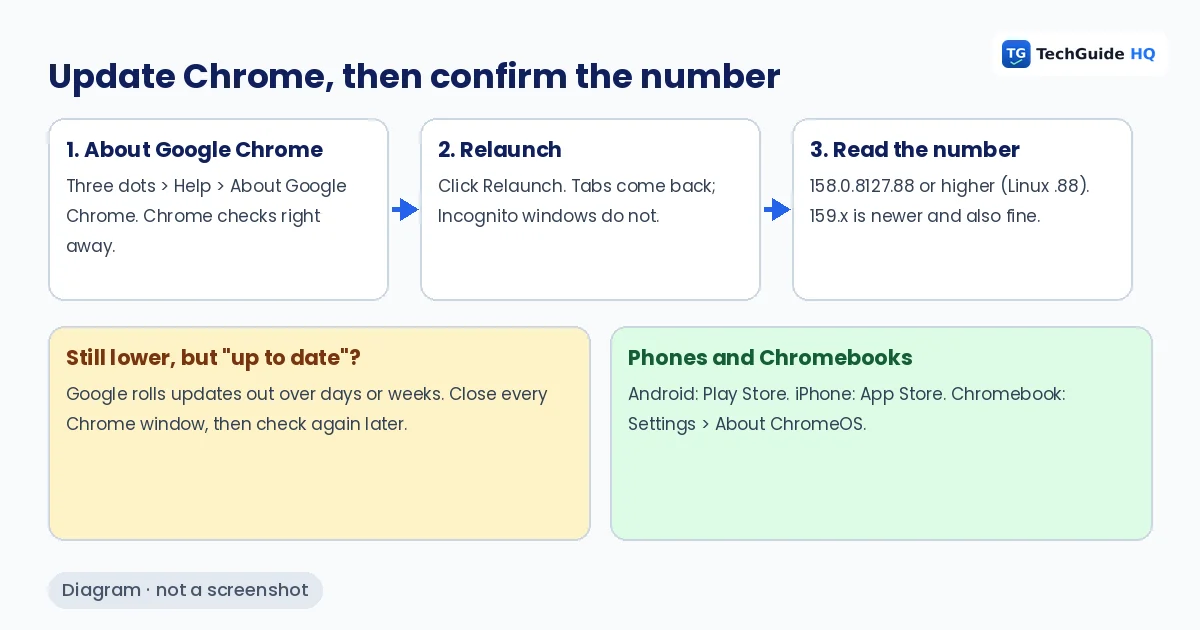
- Go to Help > About Google Chrome. Chrome checks for updates as soon as this page opens.
- Wait for the check to finish. If an update downloads, a Relaunch button appears.
- Click Relaunch. Chrome closes and reopens with your normal tabs and windows. Incognito windows won’t come back, so save anything you need from them first.
- Look at the number under the “Google Chrome” heading and compare it with the table above.
No Relaunch button? Google’s help page says that means you’re already on the latest version that’s available to you. On Windows, Google also suggests closing every Chrome window and tab and starting Chrome again, because the update can’t finish while any window stays open in the background.
On a Mac where Chrome sits in the Applications folder, the About page may also offer Automatically update Chrome for all users. That’s worth switching on if several people share the Mac.
Why does Chrome say it’s up to date when the number is lower?
This is the question most people get stuck on, and there are four usual reasons. Work through them in this order:
- The rollout hasn’t reached you yet. Google’s release note says the 158.0.8127.88 update rolls out “over the coming days/weeks”. During that window, the About page can honestly report “up to date” on an older build. Check again later in the day or tomorrow.
- Chrome never restarted. If you clicked Not now earlier, the update waits until the next restart. Close all Chrome windows and open it again.
- Your computer is too old for current Chrome. Google lists Windows 10 or later and macOS 13 Ventura or later as the minimum. Windows 7, 8 and 8.1 and macOS 11 and 12 no longer get new versions, so the browser stays on its last supported build no matter how often you check.
- Someone else controls updates. On a work or school laptop, a “managed by your organization” note or the error “Updates are disabled by administrator” means IT decides when Chrome updates. Ask them rather than trying to force it.
If the About page shows an error
Google’s troubleshooting page covers errors such as Update failed (Error: 3 or 11), (Error: 4 or 10) and (Error: 7 or 12). Its suggestions, safest first:
- Restart the computer, then try About Google Chrome again.
- Check that antivirus, firewall or parental-control software isn’t blocking tools.google.com or dl.google.com.
- If it still fails, uninstall Chrome and install it again from google.com/chrome. Windows users can use Google’s standalone installer. Signing in to Chrome afterwards brings your synced bookmarks and passwords back, so make sure sync is on before you uninstall.
How do I update Chrome on an Android phone?
- Open the Play Store.
- Tap your profile icon at the top right.
- Tap Manage apps & device.
- Under Updates available, find Chrome and tap Update.
To see the version, open Chrome, tap the three dots > Settings > About Chrome. Google says the Android build reaches Google Play “over the next few days”, so it’s normal for Chrome not to appear under Updates available on day one. Current Chrome needs Android 10 or later.
What about Chrome on iPhone and iPad?
Open the App Store, tap your profile picture, scroll to the list of available updates and tap Update next to Chrome if it’s there. Inside Chrome, More > Settings > Google Chrome shows the version.
The iOS release from 23 November (158.0.8127.86) is described by Google as stability and performance only, with no mention of CVE-2026-134401. Chrome on iPhone runs on Apple’s own WebKit engine (Google’s help page refers to the WKWebView limits it works within), so desktop Chrome bugs don’t map one-to-one onto the iPhone app. Keep the app updated anyway, and keep iOS itself updated, since Apple fixes the engine underneath.
And on a Chromebook?
A Chromebook’s browser updates with ChromeOS, not on its own. Go to Settings > About ChromeOS > Check for updates, then restart when asked. The 23 November ChromeOS release is 16868.29.0 with browser 158.0.8127.98.
What is CVE-2026-134401, in plain English?
Google’s release note lists it as “Improper input validation in Variations”, rated Critical, and says Google found it itself on 28 August. The CVE record adds the part that matters for ordinary users: in Chrome versions before 158.0.8127.88, a remote attacker could potentially run code outside Chrome’s sandbox through a specially crafted web page.
Three details help you judge the risk without panicking:
- It needs a visit to a booby-trapped page. The CISA scoring attached to the CVE record (9.6 out of 10) marks it as needing user interaction, meaning you’d have to load the malicious page.
- No known attacks so far. Google’s note doesn’t say it’s being exploited, and CISA’s assessment dated 24 November lists exploitation as “none”. That can change, which is why updating now is sensible.
- Bug details are locked for now. Google normally keeps technical details private until most users have the fix, so any “full exploit explained” article you see is guesswork at best.
We’ve seen the label “emergency update” in news headlines. Google itself calls it a normal Stable channel update. The urgency comes from the Critical rating, not from any official alarm.
Do Edge, Brave and other Chromium browsers need updating too?
They share Chrome’s open-source base (Chromium), but each company ships fixes on its own timetable, so check each browser separately.
- Microsoft Edge: Microsoft released Edge Stable 158.0.4370.45 on 25 November, saying it includes “the latest Security Updates of the Chromium project”. When we checked, Microsoft hadn’t yet listed which CVEs that covers. To update, open Edge, go to Settings and more (three dots) > Help and feedback > About Microsoft Edge, then restart if asked.
- Brave, Opera, Vivaldi and others: use each browser’s own About page and release notes. We haven’t confirmed which of their versions include this particular fix, so we’re not listing numbers.
Advice to ignore
- “Your Chrome is out of date, click here to update.” Chrome never asks you to download an update from a pop-up on a website. Pop-ups like that are scams; our guide to the fake “your iPhone has been hacked” warning explains how the same trick works in Safari.
- “Clear your cache to get the update.” Clearing browsing data doesn’t update anything. Only the About page, an app store or ChromeOS updates do.
- “Reinstall Chrome to be safe.” Not needed if About Google Chrome works. Reinstalling is the last resort for failed updates, not the first step.
- “Download Chrome 159 from this mirror site.” Only get Chrome from google.com/chrome, Google Play or the App Store.
Frequently Asked Questions
Will updating Chrome close my tabs or delete my bookmarks?
No. Google says Chrome saves your open tabs and windows and reopens them after the relaunch. Bookmarks, passwords and history aren’t touched. Only Incognito windows don’t come back, so finish anything open in Incognito first.
How often does Chrome update itself?
Chrome checks for updates in the background and installs them when you close and reopen it. If you rarely close the browser, open Help > About Google Chrome now and then so a waiting update can finish.
Is Chrome 159 out for everyone yet?
Not yet. On 24 November Google started an early Stable release of Chrome 159 to a small percentage of Windows and Mac users. Most people will move from 158 to 159 later. Either way, 158.0.8127.88 or later already has the CVE-2026-134401 fix.
Do I need to restart my whole computer after updating Chrome?
Usually not. Relaunching Chrome is enough. Google suggests restarting the computer only if an update fails or shows an error.
Related guides
- How to remove the Gemini button from the Chrome toolbar
- How to check your Java version on Windows 11
- iPhone “hacked” notification on Safari: what to do
More browser and app help is in our Internet & Apps section.
Sources (opened 27 November 2026, PKT): Google Chrome Releases Stable Channel Update for Desktop, 23 November 2026 and the November 2026 release archive (Android, iOS, ChromeOS, Extended Stable and early Stable notes); CVE-2026-134401 record; Google Chrome Help Update Google Chrome and Fix Chrome update problems and failed updates; Microsoft Release notes for Microsoft Edge security updates.
Last updated: November 27, 2026 · By Abubakar Iqbal

I run TechGuide HQ from Islamabad, Pakistan. My team and I write step-by-step Windows, iPhone, Android and app guides, check them against official help pages, try some steps on my own devices, and personally answer questions sent through the contact page.